

Everyone knows of Pinterest. You use it late at night to find cool recipes, cleaning hacks, inspiring quotes, and more. It’s great when you have some free time to browse the Internet but, did you know that Pinterest is an awesome, FREE untapped source of marketing for your business? Pinterest is a great place to find customers. With a couple simple techniques, you can use it to transform your business and get loads of customers month after month.
In this blog post you will learn 5 free strategies for optimizing your Pinterest account for growth and drive customer traffic to your business.
Here are 5 tips for using Pinterest for marketing:
1. Setting up your professional profile
First, you want to make sure you have a Pinterest account for your business. Completely fill out your profile. This means add an image (business logo, personal photo of owner, etc.), write a keyword rich description, and add your store url.

Next, you want to have at least 10 boards with a minimum of 10 pins on each board. The more boards the better, so if you can have 20 or 30 boards, even better. With Pinterest, being specific is key.
For example, if you own a bakery, instead of having boards like Breakfast, Lunch, Dinner, or Entrees, why not dive deeper? Some better boards? Chocolate, Seafood, Allergy friendly recipes, Kids meals, etc. What’s better? Have both types of boards shown in the example above. Once your profile and boards are set up, it’s time to upgrade your account.
2.Upgrade your Pinterest account
Ok, so you’re not actually upgrading your account. There is no option for that on Pinterest right now. But, you are going to make your account a business account and add rich pins.
You’ll visit Pinterest for Business and set your account as a business account. It’s free and it’ll give you access to business tools like Analytics and Promoted Pins.
What Pinterest Analytics Tells You About Your Audience


Rich pins add a little extra information to each pin. It’s a great way to brand your pins even further and get more business exposure.
Visit the Pinterest Rich Pins page to get started.
3. Get pinning
The best way to grow your followers on Pinterest and get loads of traffic is to get pinning! Be active and pin often. You will want to pin at least 25 times a day. Top pinners pin hundreds of times daily. Who has that kind of time? I’ll tell you how YOU can pin several times a day (even hundreds of times daily) without being chained to your computer on Pinterest all day. You use automation tools!
Automation tools sync to your Pinterest account. You spend an hour a week (or less) setting up your pinning queue and the tool will pin on your behalf on autopilot all week long! Some examples: Tailwind, Boardbooster, Buffer, etc.
4. Join Group Boards
Pinterest has group boards. These are themed boards with more than one collaborator. An example:

To find group boards, first you want to think about what kind of business you have (your niche) and target related boards. Go to Pingroupie (it’s free) and search for boards in your niche.

How to Use Pingroupie:
Step 1:
Visit Pingroupie.com. If you don’t have any specific group boards in mind, search by description.
Using the bakery example shared above, imagine you’d like to search for Dessert Group Boards.

Step 2:
Type your search term in the Description (as shown above) then hit Enter
Step 3:
Get your results

You can sort the results by number of collaborators, followers, likes, pins, or repins. You can click directly on the board title to go to that board.
For example, if you’d like to join the Desserts group board (the first result above) click the board title.

It will take you to the Pinterest group board.

From here, on some boards there are instructions for joining the board. If instructions are present, they usually say to email the admin at their email address (shown in board description). If instructions are not present (shown above), you can go to the admin’s page, find their website and email address to contact them requesting to join the board. That’s it!
Here’s an example of a group board with instructions on joining:
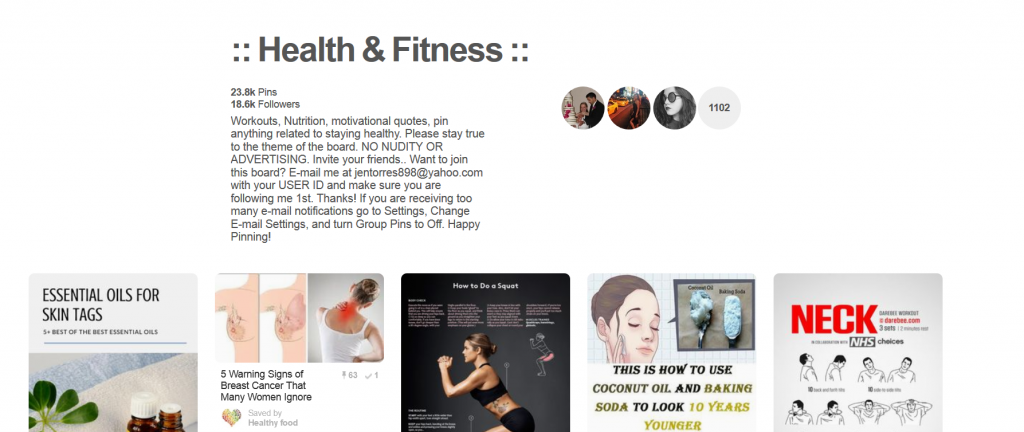
You can see the email address the admin left along with instructions for applying to join as a collaborator and the board rules.
6 Ways to Get Pinterest Traffic To Your Website
5. Join Facebook engagement groups for Pinterest
Have you heard of Facebook groups? Just like Pinterest has group boards, Facebook has groups. On Facebook, groups will revolve around a theme and exist for collaboration, learning, and networking.
You will find engagement groups for Pinterest, like Pinning Ain’t Easy, for example:

Pinning Ain’t Easy is an engagement group that offers engagement threads for members. What’s an engagement thread? It’s a thread for engagement to your blog or business.
Some examples:
- Share for share threads (Ex. Pinterest pins, Stumbleupon shares, etc.)
- Like for like threads (Ex. Facebook likes, etc.)
- Follow for follow threads (Ex. Pinterest follows, Facebook follows, etc.)
Search Facebook for related boards in your niche and click the Join button. Want a list of my 75 Facebooks groups I’m a member of? Grab it for free.
There you have it, 5 easy, free strategies to grow your Pinterest account like crazy and get traffic to your business. Implementing these strategies is straight forward and you should be able to complete all 5 in one day. From there, sit back and watch your traffic grow. The most successful Pinterest marketers are obsessed with the platform. With the help of these tips and 5 free strategies, you will soon be in the ranks of them.
Follow me, Jenn Leach, creator of Drink Coffee & Prosper and Love My Blog, in my journey of conquering the blogosphere using simple techniques to easy strategies to grow my blog.
Like what you read? Check out my traffic course, Zero to 10K, where I teach you how to get 10,000 visitors in just 30 days or less! Now 50% off with code JANUARY.
Author Bio:
Jenn Leach is the owner and contributor for Drink Coffee & Prosper and Love My Blog. She enjoys writing about work from home life, blogging, starting a business, side hustles, flipping websites, social media, and more. She shares her successes and failures in hopes of helping other bloggers and writers achieve success. Scoop the latest traffic course here!

Thanks, great ideas for points I’ve been pondering.
Oh my goodness, this was amazingly helpful!!! I went to the pingroupie sight and ofcourse found nothing for retail management…;) I didn’t really expect to, just tiny hopes I suppose. 😉 I will be able to find some great stepping stones myself though!!! And I’m excited about that, I kept reading about groups but had no idea how to find them! THX!
I started using Pinterest a few months ago and I’ve already seen the results! Thanks for these tips, I’m going to try out pingroupie and Facebook Groups for pinterest!
Awesome tis! Thank you so much for all the great info!
Thank you for these tips! A very in-depth guide. I’ve been wanting to get more active on Pinterest and this will help a lot.
Great ideas all in one spot! I’m focusing on pinterest this year and appreciate this find!
Great ideas, thanks for this post! I really liked how you gave overviews of 5 very different, yet related techniques that could combine to be very powerful.
Thank you for these tips!!!!
xo, Margot
http://thepastelproject.com/
Good info and tips! Need to get more involved on my Pinterest.
Thanks for this list! I’m focusing on pinterest right now and need to make some changes.
I am really trying my best to LEARN HOW TO MANIPULATE Pinterest because I KNOW it’s the best means for traffic these days!!
I was was just struggling yesterday to figure out how to set up rich pins on Pinterest. Love the set-by-step instructions and screenshot! Thanks for the tips!!
Great tips and resources for Pinterest, Brian. Thank you for sharing.
I need to spend some time focusing on my Pinterest account and growing it.
After reading this, I realized how much of a Pintrest newbie I really am. I signed up to get your spreadsheet, and I’m so excited to get started! Thank you so much! x
Love these tips! Pinning for later 🙂
Great ideas and encouragement! Thanks!
Great guide, pinterest works so well right now for driving traffic but I meet so may bloggers that have never even heard of pin groupie.
Another thing that is super helpful that I didn’t see mentioned is that you should create vertical images for your content that are super appealing and in the Alt description, add keywords for your content so that people will find your pin when searching for it!
I’ve been trying to up my Pinterest game so this was very helpful. Thank you!!
I’m in the process of revamping my Pinterest Business Account so thank you for these helpful tips!
Great post Brian! Pinterest is one area I haven’t really focused on but I need to.
I am still struggling with Pinterest. I have a pinterest but I am afraid that what I have been doing is wrong. I am more active in Facebook, Instagram, and Twitter. Maybe when I have a luxury of time, I am going to study again how to promote my blog using Pinterest.
Just recently made a Pinterest account for my blog, so this is so helpful – thank you!!
This info is super useful for bloggers! Pinterest accounts for 80% of my traffic and I swear by many of these tricks.
I must definitely try Pingroupie!
I didn’t realize there were Facebook Pinterest groups! The things you learn. Thank you!
This is such great advice. I asked to join the Facebook group for pinterest!
Awesome advice – thank you!! Great post!
useful post, good advice for anyone who wants to up their pinterest game! 🙂
I have such a hard time with Pinterest this is a great way to improve my Pinterest game! Thanks
Thanks for this – Pinterest is the social media account I’m working on growing this month so these tips are really helpful!
Thanks so much for this blog post! I’m still trying to figure out pinterest and get traffic from it! Hopefully it will start coming soon!
Wish I had stumbled on your post while I was setting up my own pinterest account and profile. Wonderful tips.
This is one of the most comprehensive and well detailed guides to pinterest I’ve read. I’m going to implement many of the suggestions you offered right away!
Awesome post thank you so much. I am a new blogger, only a week old and this article really give me some insight with pinterest! Ty..
Stacey
demirviews.com
Than you for providing these tips! Because I need to step up my pinterest game!
Wow, this is super helpful! Thanks for sharing all these secrets. I am totally stealing them 🙂
This is great information! I love Pinterest and am always looking for ways to improve its usability.
What a great post ! Needed some of these tips !
These are so helpful! I am starting to really work on my Pinterest account so these tips are great!
Great Pinterest introduction!
good post, I’m still quite lost about Pinterest… I found it a great place for inspiration though!
Hi Brian,
Thanks so much for this, it’s SUPER helpful.
I know that Pinterest should be a priority for my blog but I’ll be honest it was a bit overwhelming and it feels way more time consuming than some of the other social media outlets.
Bookmarking this and following each step this weekend to get on the Pinterest train.
Wish me luck!
Thanks,
Nadalie, It’s All You Boo
My New Post: What’s Your Superpower?
This is great! Thanks for all the useful tips and tricks!
I really need to do better marketing with pinterest. I hardly use it and it’s such an effective tool.
I have been on Pinterest almost right from the start but I still learned something from your post! And…I think its time to try new group boards, thanks for the freebie!
I really enjoyed reading this post. I don’t consider myself very good at Pinterest as a traffic generator, yet I hear from others in my niche that see it as a top source. Some of the tips are great quick takeaways to support – I’ve requested to join the suggested Facebook group! Fingers crossed I’ll see more traffic from this source soon!
Thank you so much for making this post, mastering pinterest was my April goal but I think its going to need to be rolled into May as well as I feel like I still have so much to learn! I am going to keep this post in my back pocket to come back to again and again.. my back pocket being pinterest 😉
Thank you for this article Brian! Great tips. I’ll convert my personal account into a business one straight away! 🙂
Board Booster and PinGroupie are the best! I have really been trying to up my Pinterest game lately and I am definitely seeing a difference 🙂
Love this. Pinterest is definitely the place to be. I’ve been working on mine as well. Thank you for these ideas!
Very informative post! Thanks so much for sharing ????
Excellent ideas with some great resources. I will be including some of these in future. Thank you.
I really should take Pinterest more seroiusly 🙂 I know it’s an amazing search engine that yields great results to drive traffic. I also use it for researching content when I don’t know what to write about.
This is a great breakdown of Pinterest. Definitely saving this for reference.
Great post. I agree that optimizing your profile makes all the difference it completely changed the pinterest game for me.
Hi Brian! I have never understood Pinterest but this is quite helpful. I am going to pin it to use this and bother you if I get stuck. Thanks for sharing!
This is really a great and informative post, still on my to do list along with 100 others! Thanks for sharing
Thanks for this excellent resource. I have to up my Pinterest game.
OMG! I definitely needed this guide. It’s super useful thanks for putting it together. Pinterest is one platform I still haven’t got my head around.
Amanda | https://ldnrose.com
Great post, I’m definitely saving this, mastering Pinterest is my goal for the next few months!
There are a lot of great ideas in this post! I’ve found that joining group boards has been so helpful in addition to switching over to a business profile!
Great post!