

A few weeks ago I made the change from mailchimp to convertkit for my email marketing campaigns. This change was simple: it only required an initial few hours of learning and migration.
First of all I want to tell you about both tools. Then I’ll give you a quick little tutorial on the options you’ll find in ConvertKit.
What is Mailchimp?
- Manage email lists
- Create Automation emails: Campaigns, email when you publish a post, etc.
- Import and export contacts
- Graphs Reports lets you see the effectiveness of campaigns.
What is ConvertKit?
- Manage email lists
- Create Automation emails:Campaigns, email when you publish a post, etc.
- Import and export contacts
- Graphs Reports lets you see the effectiveness of campaigns.
- Segregate subscribers based on action. Example: When a person finishes a course and has started a new course, it automatically gives them a tag to identify the change.
So if they both do the same things, why did I change? The truth is that I watched several recommended videos and I saw the ability to modify and edit the emails and I loved that.
Mailchimp was very tedious and very slow to change. It is supposed to be very comprehensive, but the truth is that I was not impressed.
In ConvertKit I saw that despite being a paid app (MailChimp is too, but has a free plan) it is very comprehensive, very simple, and it is made and designed for bloggers. Its creator made the app to solve the problems he had, so everything was well thought out.
What options are available in ConvertKit?
Upon entering ConvertKit first thing we find is a superior menu with different options.
- Forms: An overview of statistics and where you can enter your subscriber lists, view different types of forms, landing pages, etc. Here you can create new forms.
- Courses: This is is imperative for any email marketing manager: the email automation. With this I created my courses, and you can create as many as you want. I get notified when a person joins my emails.
- Broadcast: For specific emails, this is used when you want to do a normal delivery that is not automated. You can also keep drafts that are created manually when a post is published on your blog if you set this up in the ‘automation’.
- Subscribers: Manage your subscriber list. Here you can import and export.
- Automations: This is where you can set up automatic actions to be performed when a certain action happens. For example, when an article is published in my blog, it automatically drafts an email to send to my list. Or when a person finishes a course, it automatically labels it ‘course complete’.
- Acounts: And this, of course, are options in the General Account. Billing, API Keys, etc.
FORMS in ConvertKit

Here’s a snapshot of what you find when you go into your panel, the Forms section. Here you see the statistic showing you the leads you have generated and in what form they are generated. If you have multiple forms, this will let you see at a glance which works best.
Within this section you will see the main section beneath the graph to the right is: Create Form
Create Form is, obviously, used to create a new form. This is what I will use on the web page or for a landing page. The simplest way to use this is to use templates for the form. Although they are very simple, they allow for some ability to edit styles: color, text, etc. If you have some knowledge of CSS or HTML you can create your own form to your specific needs.
Forms – Create Form

You can choose whether you want to create a landing page or a normal form. This is the main reason why I decided on ConvertKit, because I saved the LandingPages I previously used, and unified them in Convertkit.
Create Landing Page and templates

If you choose a Landing Page these are the prefabricated options that ConvertKit gives you. Their pages are a great landing for your products, services, webinars, chats, or whatever you need.
Design your forms with ConvertKit

If you are creating a form, you have a few options, from very simple to the more complicated landing Pages. It is not the best in design, but the important thing is effectiveness. Besides, you can tweak the code and change what you do not like.
COURSES in ConvertKit
This is the best part of online marketing: automated functions and sending emails. You can create courses and send emails with a few simple steps. It’s simple and super helpful.
In my case, I have two courses. The course below I just started promoting. The other is the more successful, and now that I use ConvertKit it is easier to edit. I’m going to improve it every month to make it a complete course and above all, it will be FREE.
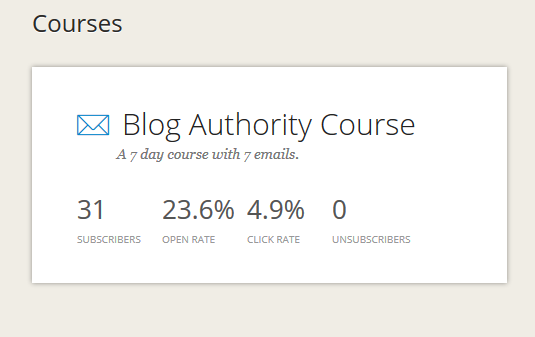
Manage Courses in ConvertKit

In the image above you can see one of my more successful courses. You can also see that it is very simple to use. You click and drag, click to create and write. It couldn’t be easier. This is precisely the reason I switched to ConvertKit , for ease of use.
BROADCAST in ConvertKit

This is the manual way to send emails. It’s where you can create a campaign, choose the audience you want to reach, and send. It’s also very simple, but the best part is that it’s fast. This email marketing service makes your job easier and accessible to everyone.
Subscribers in ConvertKit

It’s very simple to import and export contacts, and if you have a big list of emails, they help you with the import. It’s much cleaner and simpler than it was before with my other email service provider.
AUTOMATONS in ConvertKit
Automation rules are the glue that hold your entire workflow together. Trigger an action when a product is purchased, a course is completed, or when someone subscribes to a new form.
Something like: If this happens, do this other thing. It’s a simple if / then formula that helps you save time.
It lets you customize your tasks easily.
Automating is the key , as I told you many times. And with this option within ConvertKit you can do practically anything.
ACCOUNTS in ConvertKit
And here you can see your options control panel. It shows you your billing plan, time preferences and shipping options.
You can also set the email to send a picture and your name to your readers.
Let’s talk about prices and plans for ConvertKit
With ConvertKit, there is a free trial, but it’s more than worth it to pay the small fee for the starter plan. Other services such as MailChimp also will require you to pay for anything over 2,000 subscribers. So pricing really is similar between services.
The price is based on the number of subscribers you have:
- 1,000 subscribers – $ 29
- 3,000 subscribers – $ 49
- 5,000 subscribers – $ 79
- 8,000 subscribers – $ 99
You can reach all the way to 900,000 subscribers, and hey, if you get to that I assure you, you will not mind paying the price
My recommendation
If you have a newsletter or an email lists, switch to ConvertKit now, no kidding. It is much better than any other autoresponder I have used.
If you need help or advice on what to do and how to start it just leave a comment below or join my Private Facebook Mastermind Group
But definitely start collecting emails, whether you have a brick and mortar pet store or if you have a website it’s very important.
Other resources that may interest you:
Give ConvertKit a test run and let us know how you like it below
Share and leave a comment and your impressions of this article below.


Quite an informative article, of value to us as currently we are just initiating Mailchimp, thanks for sharing your views.
Mailchimp is good if you are just starting out, But if you want to segment your list and create courses I would definitely go with convertkit
Getresponse
Hey thanks Brian, been looking at convert kit for a while now. Wasn’t sure if I wanted to switch
What are you switching over from?
Great article, you have clearly put a lot of effort and time into this and it shows. I’m probably the worst when it comes to technology but I’m actually going to show this to my brother, I think it would really interest him so thanks for sharing Brian!
I really don’t understand the email management system but am determined to learn. I keep hearing how important it is. So much to learn…thanks for sharing this info!
I am not really good with technology so I am not sure I understood everything. But I am open to learning more about them and having an idea. 🙂
I’m yet to use either platform but need to start soon for a contact and was looking into MailChimp but I’ll definitely shop around a bit first and look into Convert Kit too
Nice work! Love the detail in your review for both mailchimp and convertkit… when I get to that point for my blog, I’ll have to check this out! right now I use the generic wordpress email/ subscription. thanks for the info!
I used mailchimp since I started blogging and I love it so far ! and even though I don’t really spent so much effort in email marketing I don’t really see the different
Thanks for the beautiful article. I know mailchimp (well when I say know I mean that I’ve heard of it) so will have a look into Convert Kit too. Need to use something like that on my blog soon!
Honestly I have never heard of convert!!! I might have to look into it if your saying it’s better than mailchimp.
Convertkit does sound like a great option. I think it would be great for many different kinds of business owners.
Thanks for this comparison! I have wondered about the two. I like choices but I have found the same thing you did in mail chimp. It was a good free version but it wasn’t enough to sustain a business and give you all that you can through convertkit!
Pretty great info here. I use mailchimp and we started using it because it was free. We don’t have a lot of subscribers, but this is an interesting alternative for when we decide we need an upgrade.
I have heard of mailchimp but never really know much about it. Thanks for the information!
Some great information shared! I am using mail-chip and satisfied with it. Though after reading your post, I will check out more about ConvertKit.
thanks for sharing some great info!! We use mail chimp and i like it! will check out covert kit too…looks like a good upgrade
I’m on mail chimp right now, but I think I’ll upgrade to convertkit later on!
I really need help with my mailing list because my subscribers do not seem to be getting my emails when I upload a post. Maybe I should try mail chimp.
You need to broadcast it to your email list when you make a post
I think $29 for 1000 subscribers is a lot of money. I am currently using mailchimp together with instapage for small campaigns and a bulk email sender for larger ones.
That actually is very cheap. You should be selling to your list and building a relationship with them. My list is worth $1.75 per person. I can send out a email promoting a product and can make a few sales.
I am paying £300/year for my bulk email sender and I am allowed to send 20.000 emails each day to my subscribers, out of each around 300 convert into a sale weekly. The average value of a sale is £100. Having these stats, I do think that the $29 is expensive for only 1000 subscribers.
Glad you found something that works for you now. I’ve not set up a mail system yet. I’m still working on getting my traffic and subscriber count up. It’s in double figures so far. Any tips?
Here is a great blog post that shows you how to grow your traffic. They also have a Free 5 day traffic course you can sign up for at the bottom of the post http://bloggersmastermind.co/3-social-media-strategies-thatll-grow-blogs-traffic-thousands-views/
I’ve never heard of Convertkit. I have always been using Mailchimp. Good to know this information. When my subscribers grow bigger, then, I would certainly look at Convertkit. – Allan Liwanag
This is interesting, I hadn’t heard of Convertkit before.
Thanks for this, Brian. I have been considering ConvertKit for a few days now. Glad to read about this. Now I’m sure. Haha.
Caren | carenshope.com
Thank you! This is very informative!
This is great Brian! I’ve been wondering about ConvertKit, and your detailed review helps a lot.
This is a super thorough review — thanks, Brian! Good to keep in mind for future reference.
Emma | http://www.creativexplorations.com
I have always been using Mailchimp.This is very informative!.Thanks for this, Brian.
Great article! I’m just starting to think about sending out newsletters. This comparison has helped.
It looks amazing and I will keep it in mind when I’m ready to pay for it. I use Mailchimp basically because it’s free.
FINALLY someone lays out the differences in these two! I’ve been thinking of switching and now I feel like I understand why Convertkit is a favorite among experts. Thank you for writing this!
I’ve been hearing a lot of great things about ConvertKit! I haven’t started my email list yet but I can definitely see why’d you’d make the switch!
Now you have me thinking about switching…
I switched to ConvertKit recently too and have been loving being able to send freebies to my audience. I want to create an email course in the near future but for now I am just enjoying the ease of using Convertkit compared to Mailchimp.
xoxo, Jenny
I’ve heard a lot about ConvertKit, but this is the most comprehensive comparison I’ve seen online! I’m so small (both my blog and brick and mortar business) that I haven’t needed to switch from MailChimp’s free option, but now I want to grow so I can have an excuse to switch!
I am currently using MailChimp but I haven’t figured it all out yet. I need to concentrate more on email marketing. ConvertKit sounds like a great option once I get this mail thing figured out.
I’ve been looking into ConvertKit for a bit. I use MailChimp now. This was very comprehensive and helpful, thank you!
Brian, I am a brand new fan of your fabulous site! Each post is jam packed with useful information. Thank you so much for your willingness to share your expertise. I really appreciate it.
I hadn’t heard of convert kit before. I’m going to check them out.
I will definitely keep this in mind when I outgrow MailChimp. I’ve heard nothing but great things about ConvertKit. Did you entire list transfer to ConvertKit?
http://www.truzest.com
I was using aweber and mailchimp and transfered both lists over.
You mention a free trial with convertkit, but I have yet to find any real links for this. Do you know of one?
Brian, this was a very good review. ConvertKit does seem to have some great features. It is worth looking into.
I use MailChimp and I’m quite happy with it at this beginner stage of my site, but I will keep ConvertKit in mind. Thanks for the info!
This looks like a great upgrade but until my blog grows I’ll have to stick with MailChimp.
We’ve used ConvertKit since day 1 and are very happy with all of the features, especially the sequences!
I’ve not really done anything with my list, and am just now looking into it. Mailchimp was recommended, but it was a lot of work. Thanks for the info. It will make the switch easier.
Great info. I know one day, I will get there.
Thanks for the info. I currently use MailChimp but I know a lot of bloggers use ConvertKit, but wasn’t sure if I could justify the $$ as a new blogger with minimal subscribers and no blogging income. What do you think about that? Do you think new bloggers should start straight on ConvertKit? Do you think it would impact the number of subscribers/engagement they get?
I am just starting to work on a mailing list and was trying to decide between these two. Thanks for the info!
Im working on my mailing list and started with convert kit from the start. I did use mail chimp for a different website a few years ago but I prefer mail kit because of the built in landing page feature.
Great post!
Foirell | http://www.citygirlrell.com
I have been thinking about making a change. Thanks for all the great info; convert kit makes a lot more sense. Super informative post!
This is a very interesting read. I’ve been with Mailchimp for a year and have been happy though you brought up really great points about Convertkit. So much more options. Definitely worth a second look!
I’m looking to switch too, I’m not a fan of Mail Chimp. I’m glad to hear convert kit is the way to go.
I’ve been noticing recently that many of the newsletters I sign up for direct me to a ConvertKit link. Thanks for demystifying it, always good to know alternatives for clients with the budget/interested in paid email subscriber plans
I’ve heard good things about convertkit but I don’t want to pay for this service just yet. Mailerlite also has a lot of the same feature for free that I’m currently testing out.
Bookmarked…this will be really useful for me in the coming week…Thanks for sharing
I want to learn about convertkit too. But I still need to work on a lot of things on my blog as of yet. I’ll bookmark the page will get message you as soon as I am ready.
Reading through your blog, it looks like convert kit is a great option to check on. I too think Mailchimp has gotten older and needs much more to get on with the current trends
http://amazingworkz.com/
Prices are equal but after having used MailChimp I am pissed that they have weakness in technical things and business doing wise
I’ve been wanting to make the switch from MailChimp to ConvertKit. I’ve heard raving reviews about ConvertKit, and I’ve been wanting a way to separate what is sent to my subscribers more easily.
I’m just getting started with email lists. Thanks for this! It’s great to know there are more options for when I get to that level 🙂 http://www.jillianschleger.com/escaping-confinement-of-massive-blunders/
I’ve heard convert kit a lot of great things about convert kit. Seems like they have a lot of support.
I need to look into this asap
This is so awesome. I used to use MailChimp, but then I kind of stopped my newsletter altogether because it wasn’t getting the results I want it. It seems like ConvertKit has so many more features and looks like it’s definitely worth the money.
I didn’t know about these two. Thanks, I will pinned this because I need to learn about this more.